# RSS Swipr: Find Blogs Like You Find Your Dates

**Author:** Philipp D. Dubach | **Published:** January 5, 2026 | **Updated:** February 22, 2026
**Categories:** AI
**Keywords:** machine learning RSS reader, Thompson sampling recommendation, MPNet sentence embeddings, personalized RSS Python open source, filter bubble RSS alternative

## Key Takeaways

- MPNet embeddings combined with a Hybrid Random Forest achieve 75.4% ROC-AUC on article preference prediction, up from 66% with hand-engineered features alone.
- Thompson sampling allocates 80% of shown articles to predicted preferences and 20% to random exploration, preventing filter bubbles while keeping recommendations useful.
- The entire system runs locally at zero cost: Python/Flask backend, vanilla JS frontend, SQLite storage, and free-tier Google Colab for GPU training.

---

<a href="#lightbox-rss-tinder-demo2-gif-0" style="display: block; width: 80%; margin: 0 auto; padding: 1.5rem 0; text-decoration: none;">
  <picture class="img-lightbox">
    
    <source media="(max-width: 768px)" 
            srcset="https://static.philippdubach.com/cdn-cgi/image/width=320,quality=80,format=webp/rss-tinder-demo2.gif 320w,
                    https://static.philippdubach.com/cdn-cgi/image/width=480,quality=80,format=webp/rss-tinder-demo2.gif 480w,
                    https://static.philippdubach.com/cdn-cgi/image/width=640,quality=80,format=webp/rss-tinder-demo2.gif 640w,
                    https://static.philippdubach.com/cdn-cgi/image/width=960,quality=80,format=webp/rss-tinder-demo2.gif 960w,
                    https://static.philippdubach.com/cdn-cgi/image/width=1200,quality=80,format=webp/rss-tinder-demo2.gif 1200w"
            sizes="80vw">
    
    
    <source media="(max-width: 1024px)" 
            srcset="https://static.philippdubach.com/cdn-cgi/image/width=768,quality=80,format=webp/rss-tinder-demo2.gif 768w,
                    https://static.philippdubach.com/cdn-cgi/image/width=1024,quality=80,format=webp/rss-tinder-demo2.gif 1024w,
                    https://static.philippdubach.com/cdn-cgi/image/width=1440,quality=80,format=webp/rss-tinder-demo2.gif 1440w"
            sizes="80vw">
    
    
    <source media="(min-width: 1025px)" 
            srcset="https://static.philippdubach.com/cdn-cgi/image/width=1200,quality=80,format=webp/rss-tinder-demo2.gif 1200w,
                    https://static.philippdubach.com/cdn-cgi/image/width=1600,quality=80,format=webp/rss-tinder-demo2.gif 1600w,
                    https://static.philippdubach.com/cdn-cgi/image/width=2000,quality=80,format=webp/rss-tinder-demo2.gif 2000w"
            sizes="80vw">
    
    
    <img src="https://static.philippdubach.com/cdn-cgi/image/width=1200,quality=80/rss-tinder-demo2.gif" 
         alt="GIF with interactive demo of the RSS Tinder App" 
         class=""
         width="1200"
         height="630"
         loading="lazy"
         decoding="async"
         style="width: 100%; height: auto; display: block;">
  </picture>
</a>


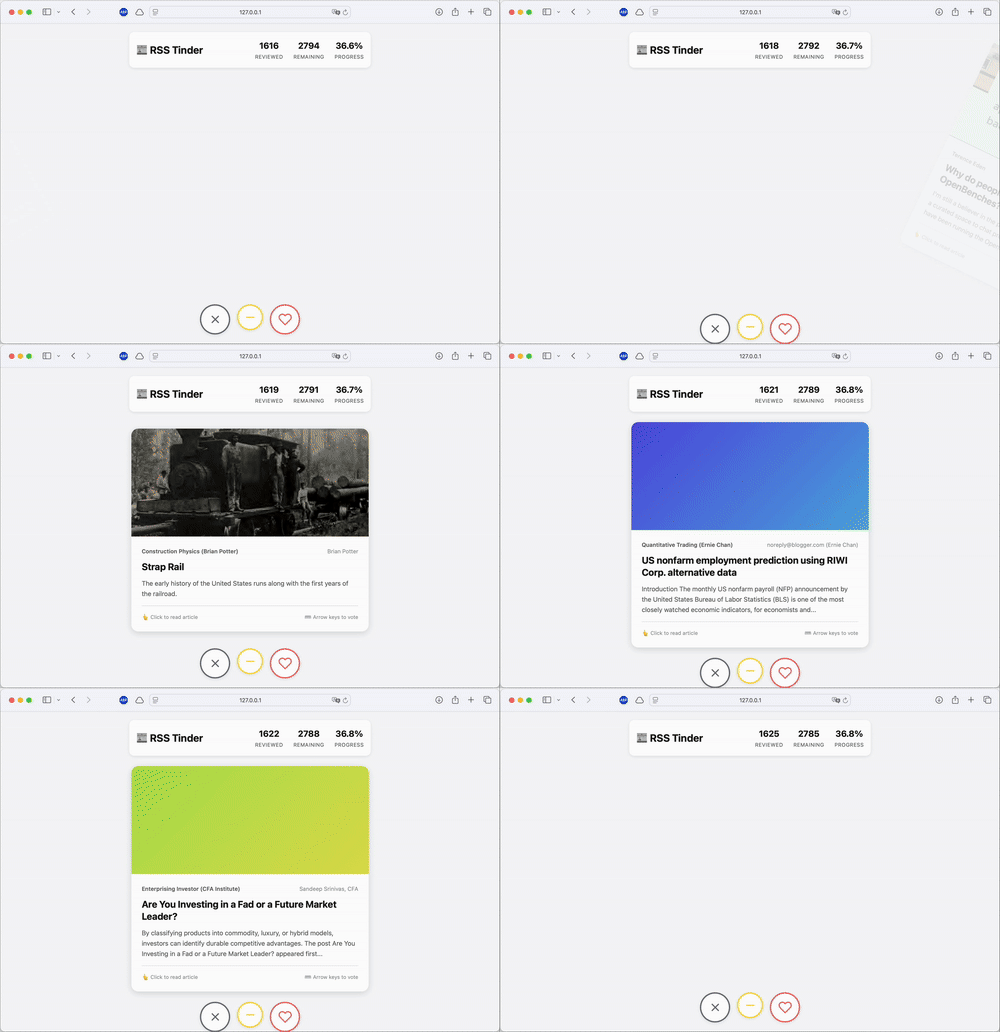
 Algorithmic timelines are everywhere now. But I still prefer the control of RSS. Readers are good at aggregating content but bad at filtering it. What I wanted was something borrowed from dating apps: instead of an infinite list, give me cards. Swipe right to like, left to dislike. Then train a model to surface what I actually want to read. So I built _RSS Swipr_. 

The frontend is vanilla JavaScript—no React, no build steps, just DOM manipulation and CSS transitions. You drag a card, it follows your finger, and snaps away with a satisfying animation. Behind the scenes, the app tracks everything: votes (like/neutral/dislike), time spent viewing each card, and whether you actually opened the link. If I swipe right but don't click through, that's a signal. If I spend 0.3 seconds on a card before swiping left, that's a signal too.<a href="#lightbox-screenshot_feed_import1-png-1" style="display: block; width: 80%; margin: 0 auto; padding: 1.5rem 0; text-decoration: none;">
  <picture class="img-lightbox">
    
    <source media="(max-width: 768px)" 
            srcset="https://static.philippdubach.com/cdn-cgi/image/width=320,quality=80,format=webp/screenshot_feed_import1.png 320w,
                    https://static.philippdubach.com/cdn-cgi/image/width=480,quality=80,format=webp/screenshot_feed_import1.png 480w,
                    https://static.philippdubach.com/cdn-cgi/image/width=640,quality=80,format=webp/screenshot_feed_import1.png 640w,
                    https://static.philippdubach.com/cdn-cgi/image/width=960,quality=80,format=webp/screenshot_feed_import1.png 960w,
                    https://static.philippdubach.com/cdn-cgi/image/width=1200,quality=80,format=webp/screenshot_feed_import1.png 1200w"
            sizes="80vw">
    
    
    <source media="(max-width: 1024px)" 
            srcset="https://static.philippdubach.com/cdn-cgi/image/width=768,quality=80,format=webp/screenshot_feed_import1.png 768w,
                    https://static.philippdubach.com/cdn-cgi/image/width=1024,quality=80,format=webp/screenshot_feed_import1.png 1024w,
                    https://static.philippdubach.com/cdn-cgi/image/width=1440,quality=80,format=webp/screenshot_feed_import1.png 1440w"
            sizes="80vw">
    
    
    <source media="(min-width: 1025px)" 
            srcset="https://static.philippdubach.com/cdn-cgi/image/width=1200,quality=80,format=webp/screenshot_feed_import1.png 1200w,
                    https://static.philippdubach.com/cdn-cgi/image/width=1600,quality=80,format=webp/screenshot_feed_import1.png 1600w,
                    https://static.philippdubach.com/cdn-cgi/image/width=2000,quality=80,format=webp/screenshot_feed_import1.png 2000w"
            sizes="80vw">
    
    
    <img src="https://static.philippdubach.com/cdn-cgi/image/width=1200,quality=80/screenshot_feed_import1.png" 
         alt="Feed management interface showing 1084 imported RSS feeds with 9327 total entries" 
         class=""
         width="1200"
         height="630"
         loading="lazy"
         decoding="async"
         style="width: 100%; height: auto; display: block;">
  </picture>
</a>


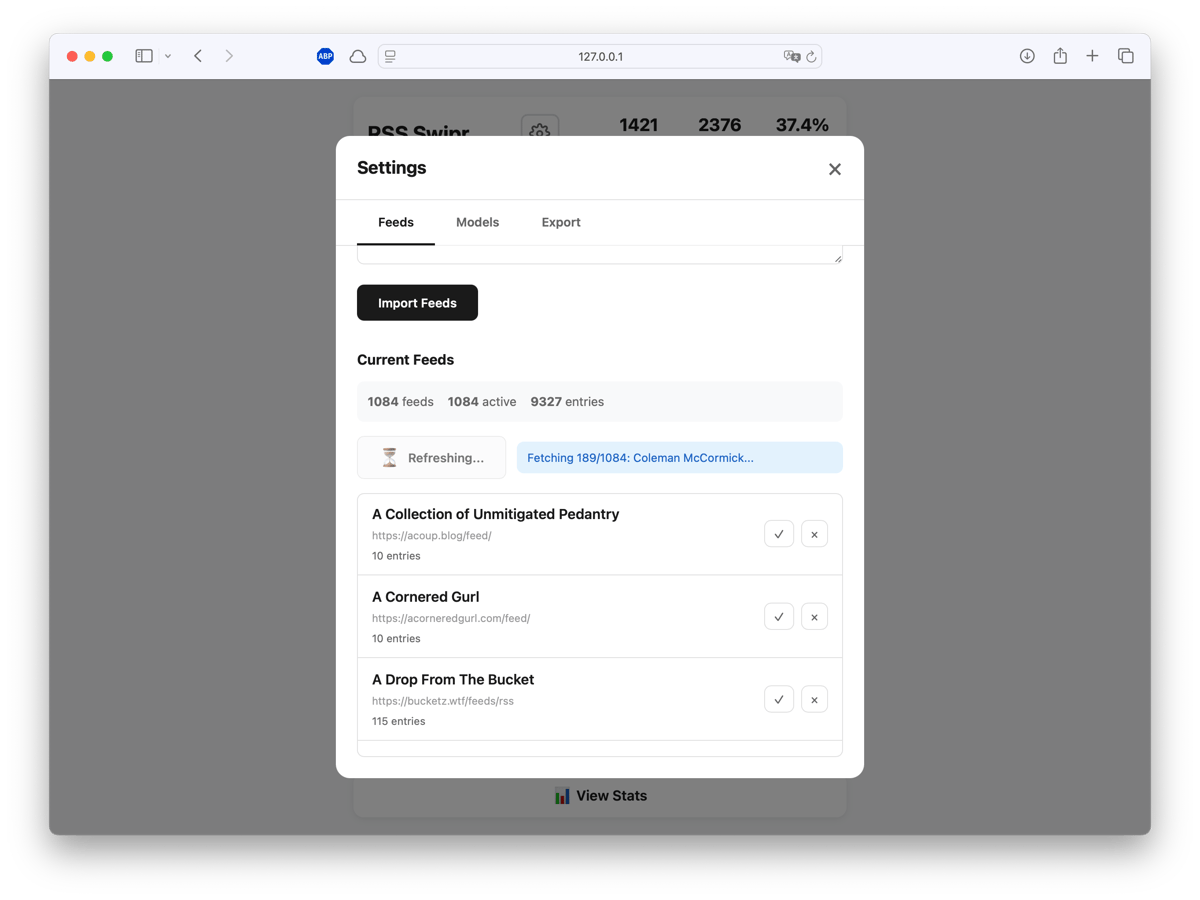
Feed management happens through a simple CSV import. Paste a list of `name,url` pairs, click refresh, and the fetcher pulls articles with proper HTTP caching (ETag/Last-Modified) to avoid hammering servers. You can use your own feed list or load a predefined list. Thanks to Manuel Moreale who created [blogroll](https://blogroll.org/) I was able to get an OPML export and load all curated RSS feeds directly. Something similar works with [minifeed](https://minifeed.net/global) or [Kagi's smallweb](https://kagi.com/api/v1/smallweb/feed). Or you use one of the [Hacker News RSS](https://hnrss.github.io) feeds. If that feels too adventurous, I created [curated feeds](https://rss-aggregator.philippd.workers.dev) for the most popular HN bloggers.

Building the model, I started with XGBoost and some hand-engineered features (title length, word count, time of day, feed source). Decent—around 66% ROC-AUC. It learned that I dislike short, clickbaity titles. But it didn't understand context.

The upgrade was MPNet (`all-mpnet-base-v2` from sentence-transformers) to generate 768-dimensional embeddings for every article's title and description. Combined with engineered features—feed preferences, temporal patterns, text statistics—this gets fed into a Hybrid Random Forest.

```python
def predict_preference(article):
    # Generate semantic embeddings (768 dims)
    embeddings = mpnet.encode(f"{article.title} {article.description}")

    # Extract behavioral + text features
    features = feature_pipeline.transform(article)

    # Predict with Hybrid RF
    X = np.hstack([embeddings, features])
    return model.predict_proba(X)
```

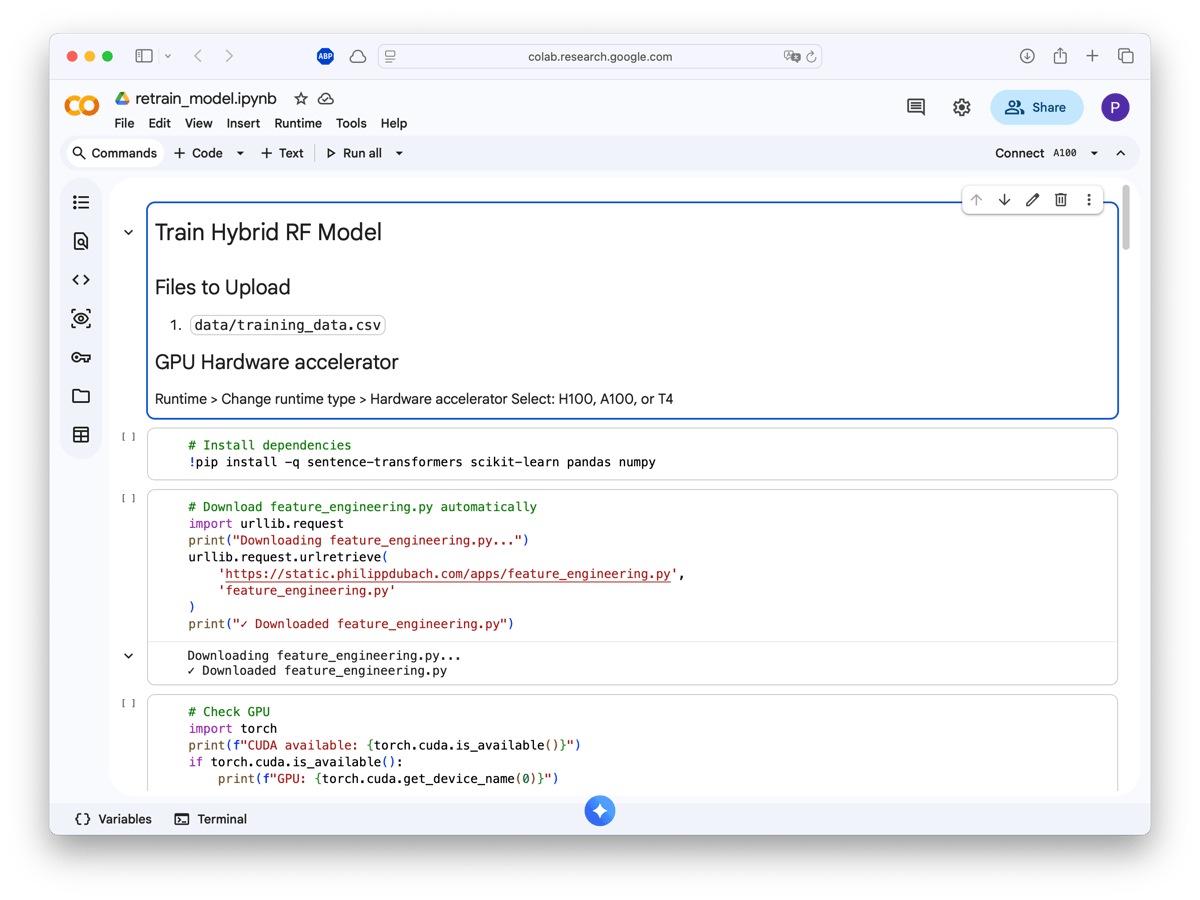
Training happens on Google Colab (free T4 GPU or even faster with H100 or A100 on a subscription). Upload your training CSV, run the notebook, download a `.pkl` file.<a href="#lightbox-screenshot_colab_head1-png-2" style="display: block; width: 80%; margin: 0 auto; padding: 1.5rem 0; text-decoration: none;">
  <picture class="img-lightbox">
    
    <source media="(max-width: 768px)" 
            srcset="https://static.philippdubach.com/cdn-cgi/image/width=320,quality=80,format=webp/screenshot_colab_head1.png 320w,
                    https://static.philippdubach.com/cdn-cgi/image/width=480,quality=80,format=webp/screenshot_colab_head1.png 480w,
                    https://static.philippdubach.com/cdn-cgi/image/width=640,quality=80,format=webp/screenshot_colab_head1.png 640w,
                    https://static.philippdubach.com/cdn-cgi/image/width=960,quality=80,format=webp/screenshot_colab_head1.png 960w,
                    https://static.philippdubach.com/cdn-cgi/image/width=1200,quality=80,format=webp/screenshot_colab_head1.png 1200w"
            sizes="80vw">
    
    
    <source media="(max-width: 1024px)" 
            srcset="https://static.philippdubach.com/cdn-cgi/image/width=768,quality=80,format=webp/screenshot_colab_head1.png 768w,
                    https://static.philippdubach.com/cdn-cgi/image/width=1024,quality=80,format=webp/screenshot_colab_head1.png 1024w,
                    https://static.philippdubach.com/cdn-cgi/image/width=1440,quality=80,format=webp/screenshot_colab_head1.png 1440w"
            sizes="80vw">
    
    
    <source media="(min-width: 1025px)" 
            srcset="https://static.philippdubach.com/cdn-cgi/image/width=1200,quality=80,format=webp/screenshot_colab_head1.png 1200w,
                    https://static.philippdubach.com/cdn-cgi/image/width=1600,quality=80,format=webp/screenshot_colab_head1.png 1600w,
                    https://static.philippdubach.com/cdn-cgi/image/width=2000,quality=80,format=webp/screenshot_colab_head1.png 2000w"
            sizes="80vw">
    
    
    <img src="https://static.philippdubach.com/cdn-cgi/image/width=1200,quality=80/screenshot_colab_head1.png" 
         alt="Google Colab notebook showing model training setup with GPU configuration" 
         class=""
         width="1200"
         height="630"
         loading="lazy"
         decoding="async"
         style="width: 100%; height: auto; display: block;">
  </picture>
</a>


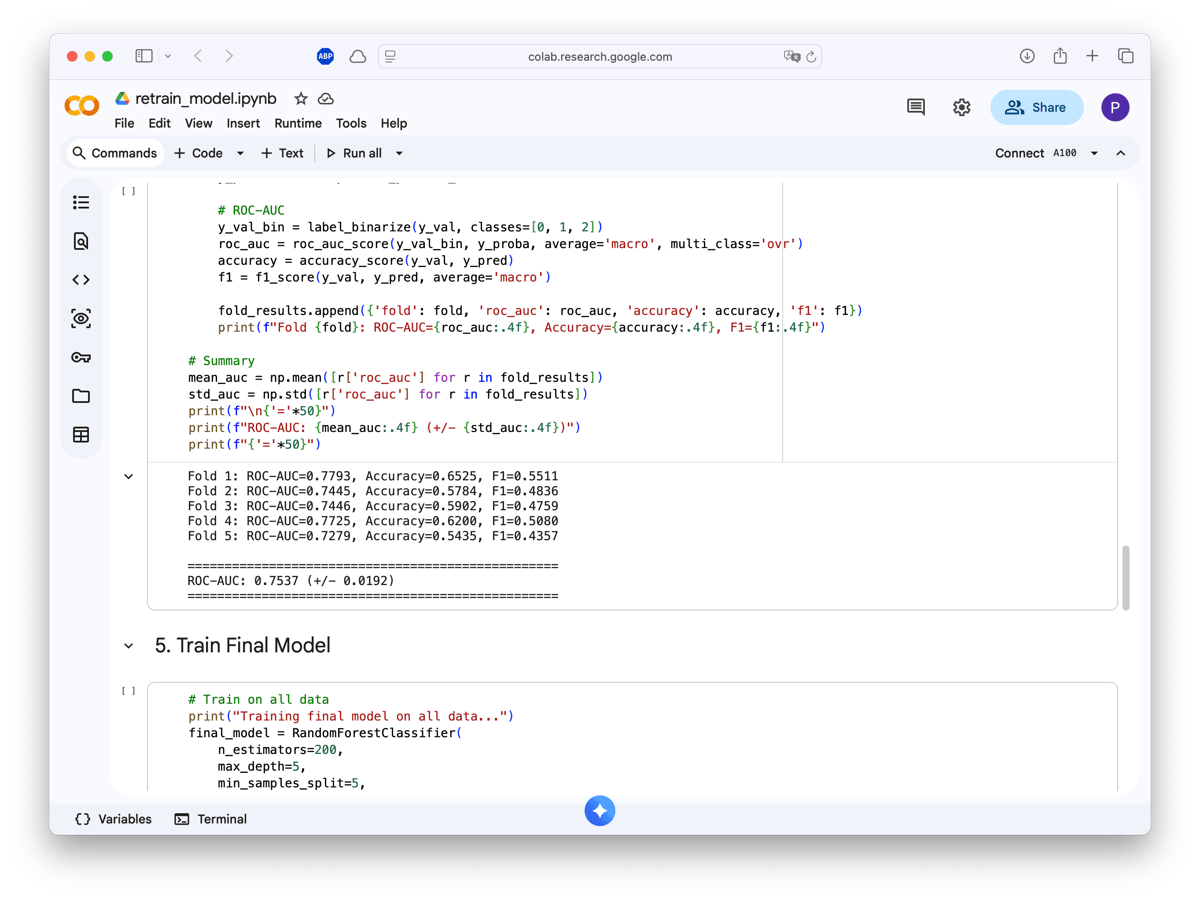
The notebook handles everything: installing sentence-transformers, downloading the feature engineering pipeline, checking GPU availability, and running 5-fold cross-validation.<a href="#lightbox-screenshot_colab_results1-png-3" style="display: block; width: 80%; margin: 0 auto; padding: 1.5rem 0; text-decoration: none;">
  <picture class="img-lightbox">
    
    <source media="(max-width: 768px)" 
            srcset="https://static.philippdubach.com/cdn-cgi/image/width=320,quality=80,format=webp/screenshot_colab_results1.png 320w,
                    https://static.philippdubach.com/cdn-cgi/image/width=480,quality=80,format=webp/screenshot_colab_results1.png 480w,
                    https://static.philippdubach.com/cdn-cgi/image/width=640,quality=80,format=webp/screenshot_colab_results1.png 640w,
                    https://static.philippdubach.com/cdn-cgi/image/width=960,quality=80,format=webp/screenshot_colab_results1.png 960w,
                    https://static.philippdubach.com/cdn-cgi/image/width=1200,quality=80,format=webp/screenshot_colab_results1.png 1200w"
            sizes="80vw">
    
    
    <source media="(max-width: 1024px)" 
            srcset="https://static.philippdubach.com/cdn-cgi/image/width=768,quality=80,format=webp/screenshot_colab_results1.png 768w,
                    https://static.philippdubach.com/cdn-cgi/image/width=1024,quality=80,format=webp/screenshot_colab_results1.png 1024w,
                    https://static.philippdubach.com/cdn-cgi/image/width=1440,quality=80,format=webp/screenshot_colab_results1.png 1440w"
            sizes="80vw">
    
    
    <source media="(min-width: 1025px)" 
            srcset="https://static.philippdubach.com/cdn-cgi/image/width=1200,quality=80,format=webp/screenshot_colab_results1.png 1200w,
                    https://static.philippdubach.com/cdn-cgi/image/width=1600,quality=80,format=webp/screenshot_colab_results1.png 1600w,
                    https://static.philippdubach.com/cdn-cgi/image/width=2000,quality=80,format=webp/screenshot_colab_results1.png 2000w"
            sizes="80vw">
    
    
    <img src="https://static.philippdubach.com/cdn-cgi/image/width=1200,quality=80/screenshot_colab_results1.png" 
         alt="Training results showing ROC-AUC of 0.7537 across 5-fold cross-validation" 
         class=""
         width="1200"
         height="630"
         loading="lazy"
         decoding="async"
         style="width: 100%; height: auto; display: block;">
  </picture>
</a>


With ~1400 training samples, the model achieves _75.4% ROC-AUC (± 0.019 std)_. Not state-of-the-art, but enough to noticeably improve my reading experience. The model now understands that I like systems programming and ML papers, but skip most crypto and generic startup advice.

The problem with transformer models is latency. Generating MPNet embeddings takes ~1 second per article. In a swipe interface, that lag is unbearable. The next best thing is a preload queue. While you're reading the current card, the backend is scoring and fetching the next 3-5 articles in the background. By the time you swipe, the next card is already waiting.

```javascript
async loadNextBatch() {
    const excludeIds = this.cardQueue.map(c => c.id).join(',');
    const response = await fetch(`/api/posts/batch?count=3&exclude=${excludeIds}`);
    const data = await response.json();
    this.cardQueue.push(...data.posts);
}
```

Article selection uses Thompson Sampling: 80% of the time it shows what the model thinks you'll like (exploit), 20% it throws in something unexpected (explore). This prevents the filter bubble problem and lets the model discover if your tastes have changed.


The whole system is designed as a closed loop:

1. **Swipe** → votes get stored in SQLite
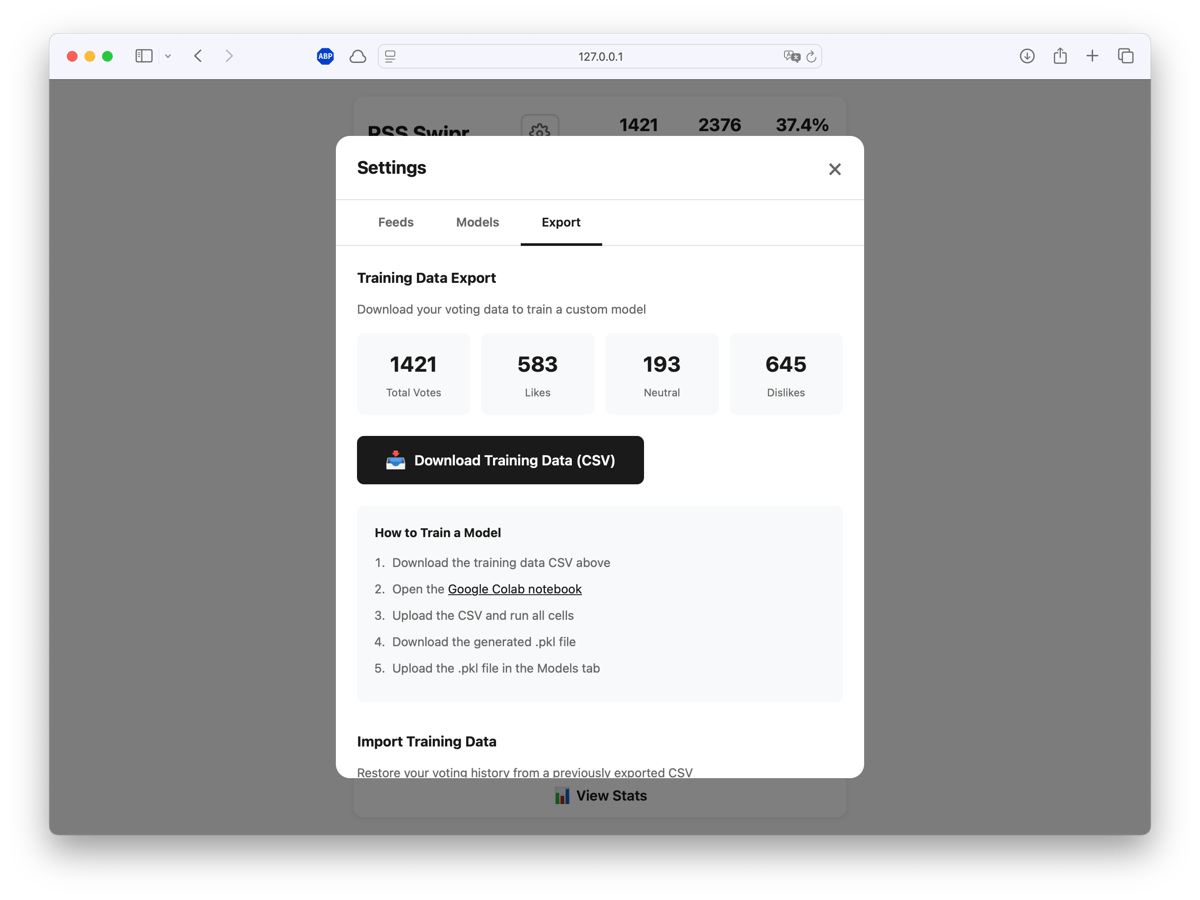
2. **Export** → download training CSV with votes + engagement data
3. **Train** → run Colab notebook, get new model
4. **Upload** → drag-drop the `.pkl` file back into the app

<a href="#lightbox-screenshot_export1-png-5" style="display: block; width: 80%; margin: 0 auto; padding: 1.5rem 0; text-decoration: none;">
  <picture class="img-lightbox">
    
    <source media="(max-width: 768px)" 
            srcset="https://static.philippdubach.com/cdn-cgi/image/width=320,quality=80,format=webp/screenshot_export1.png 320w,
                    https://static.philippdubach.com/cdn-cgi/image/width=480,quality=80,format=webp/screenshot_export1.png 480w,
                    https://static.philippdubach.com/cdn-cgi/image/width=640,quality=80,format=webp/screenshot_export1.png 640w,
                    https://static.philippdubach.com/cdn-cgi/image/width=960,quality=80,format=webp/screenshot_export1.png 960w,
                    https://static.philippdubach.com/cdn-cgi/image/width=1200,quality=80,format=webp/screenshot_export1.png 1200w"
            sizes="80vw">
    
    
    <source media="(max-width: 1024px)" 
            srcset="https://static.philippdubach.com/cdn-cgi/image/width=768,quality=80,format=webp/screenshot_export1.png 768w,
                    https://static.philippdubach.com/cdn-cgi/image/width=1024,quality=80,format=webp/screenshot_export1.png 1024w,
                    https://static.philippdubach.com/cdn-cgi/image/width=1440,quality=80,format=webp/screenshot_export1.png 1440w"
            sizes="80vw">
    
    
    <source media="(min-width: 1025px)" 
            srcset="https://static.philippdubach.com/cdn-cgi/image/width=1200,quality=80,format=webp/screenshot_export1.png 1200w,
                    https://static.philippdubach.com/cdn-cgi/image/width=1600,quality=80,format=webp/screenshot_export1.png 1600w,
                    https://static.philippdubach.com/cdn-cgi/image/width=2000,quality=80,format=webp/screenshot_export1.png 2000w"
            sizes="80vw">
    
    
    <img src="https://static.philippdubach.com/cdn-cgi/image/width=1200,quality=80/screenshot_export1.png" 
         alt="Export interface showing 1421 votes with breakdown: 583 likes, 193 neutral, 645 dislikes" 
         class=""
         width="1200"
         height="630"
         loading="lazy"
         decoding="async"
         style="width: 100%; height: auto; display: block;">
  </picture>
</a>


The export includes everything the model needs: article text, feed metadata, your votes, link opens, and time spent. You can also **import** a previous training CSV to restore your voting history on a fresh install—useful if you want to clone the repo on a new machine without losing your data.<a href="#lightbox-screenshot_model_selection1-png-6" style="display: block; width: 80%; margin: 0 auto; padding: 1.5rem 0; text-decoration: none;">
  <picture class="img-lightbox">
    
    <source media="(max-width: 768px)" 
            srcset="https://static.philippdubach.com/cdn-cgi/image/width=320,quality=80,format=webp/screenshot_model_selection1.png 320w,
                    https://static.philippdubach.com/cdn-cgi/image/width=480,quality=80,format=webp/screenshot_model_selection1.png 480w,
                    https://static.philippdubach.com/cdn-cgi/image/width=640,quality=80,format=webp/screenshot_model_selection1.png 640w,
                    https://static.philippdubach.com/cdn-cgi/image/width=960,quality=80,format=webp/screenshot_model_selection1.png 960w,
                    https://static.philippdubach.com/cdn-cgi/image/width=1200,quality=80,format=webp/screenshot_model_selection1.png 1200w"
            sizes="80vw">
    
    
    <source media="(max-width: 1024px)" 
            srcset="https://static.philippdubach.com/cdn-cgi/image/width=768,quality=80,format=webp/screenshot_model_selection1.png 768w,
                    https://static.philippdubach.com/cdn-cgi/image/width=1024,quality=80,format=webp/screenshot_model_selection1.png 1024w,
                    https://static.philippdubach.com/cdn-cgi/image/width=1440,quality=80,format=webp/screenshot_model_selection1.png 1440w"
            sizes="80vw">
    
    
    <source media="(min-width: 1025px)" 
            srcset="https://static.philippdubach.com/cdn-cgi/image/width=1200,quality=80,format=webp/screenshot_model_selection1.png 1200w,
                    https://static.philippdubach.com/cdn-cgi/image/width=1600,quality=80,format=webp/screenshot_model_selection1.png 1600w,
                    https://static.philippdubach.com/cdn-cgi/image/width=2000,quality=80,format=webp/screenshot_model_selection1.png 2000w"
            sizes="80vw">
    
    
    <img src="https://static.philippdubach.com/cdn-cgi/image/width=1200,quality=80/screenshot_model_selection1.png" 
         alt="Model management interface showing active hybrid_rf model with ROC-AUC 0.7537" 
         class=""
         width="1200"
         height="630"
         loading="lazy"
         decoding="async"
         style="width: 100%; height: auto; display: block;">
  </picture>
</a>


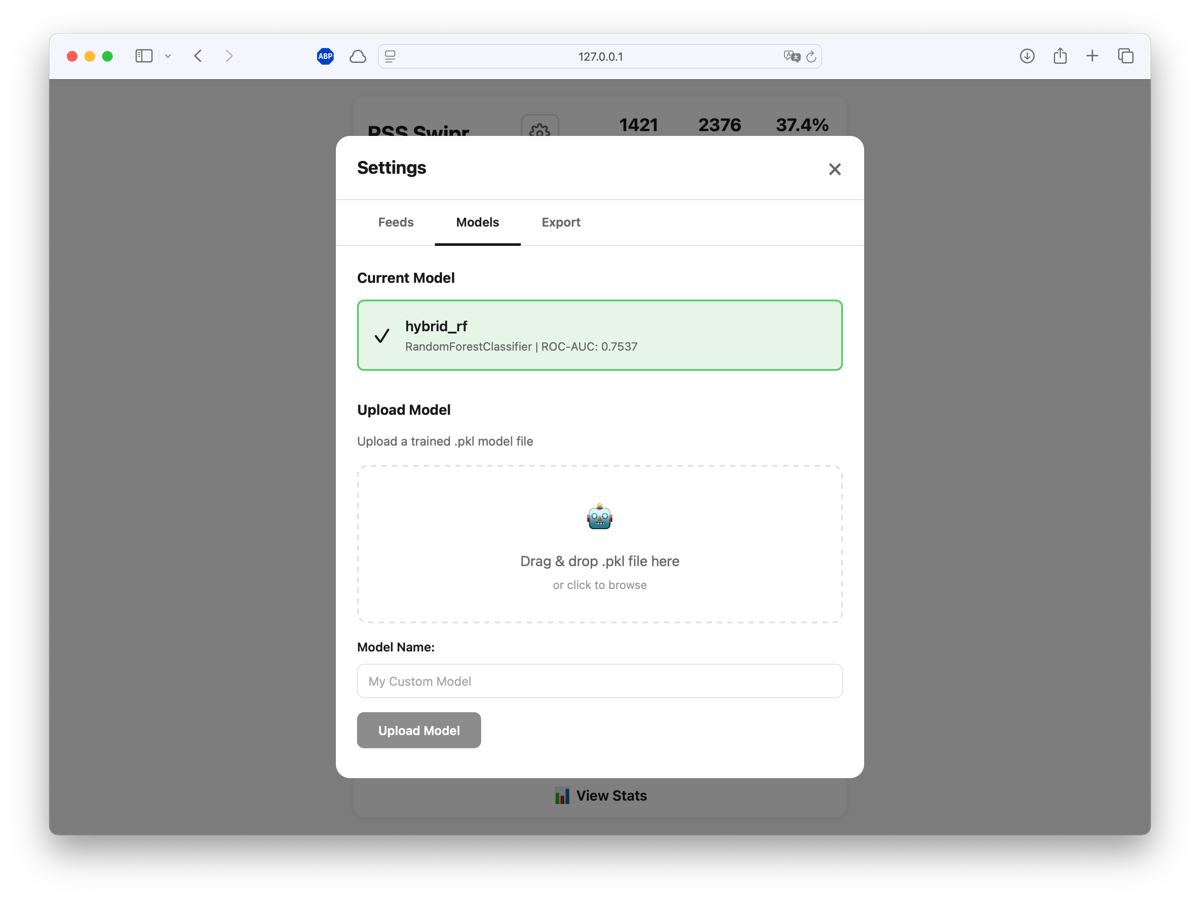
Uploaded models show their ROC-AUC score so you can compare performance across training runs. Activate whichever one works best.

**Backend**: Python, Flask, SQLite
**Frontend**: Vanilla JS, CSS variables
**ML**: scikit-learn, XGBoost, sentence-transformers (MPNet)
**Training**: Google Colab (free GPU tier)

Total infrastructure cost: zero. Everything runs locally. No accounts, no cloud dependencies, no tracking.

```bash
git clone https://github.com/philippdubach/rss-swipr.git
cd rss-swipr
python -m venv .venv && source .venv/bin/activate
pip install -r requirements.txt
python app.py
```

The [full source](https://github.com/philippdubach/rss-swipr) and [Colab notebook](https://colab.research.google.com/drive/1XjnAuwF3naPElKH9yZ3UEdslzN7qAUrQ?usp=sharing) are available on GitHub.


---

## Frequently Asked Questions

### How does machine learning improve RSS readers?

Traditional RSS readers show all articles chronologically without filtering. An ML-powered RSS reader uses sentence embeddings (like MPNet) to understand article content semantically, then trains on your swipe behavior to predict preferences. This achieves 75.4% ROC-AUC accuracy in surfacing content you actually want to read.

### What is Thompson sampling in recommendation systems?

Thompson sampling balances exploration and exploitation in recommendations. It shows predicted-good content 80% of the time (exploit) while randomly introducing unexpected articles 20% of the time (explore). This prevents filter bubbles and lets the model discover when your interests change.

### Can you build a personalized RSS reader in Python?

Yes. Using Flask, SQLite, and sentence-transformers (MPNet), you can build a local RSS reader that learns preferences from swipe interactions. Training happens on Google Colab's free GPU tier. The entire system runs locally with zero infrastructure cost and no cloud dependencies.

### How do sentence embeddings work for content recommendation?

Sentence embeddings convert article titles and descriptions into 768-dimensional vectors that capture semantic meaning. Similar articles cluster together in this vector space. A Hybrid Random Forest classifier then learns which regions of this space match your preferences based on your voting history.


---

*Philipp D. Dubach — [http://philippdubach.com/](http://philippdubach.com/) — 2026*