This is the technical companion to The First Two Hours: What 100,000 HN Posts Reveal About Online Attention. For the research results, see The Attention Paradox.
I wanted to study how attention flows on Hacker News, but existing datasets only capture snapshots. To understand temporal patterns, score velocity, and content lifecycle, I needed continuous observation. So I built a real-time archiver.
The system runs entirely on Cloudflare’s edge platform: Workers for compute, D1 for storage, Workers AI for classification, and Vectorize for similarity search. After a week of operation, it had collected 98,586 items with 22,457 temporal snapshots, enough data to reveal some surprising patterns about how online attention works.
Here’s how it works.
Architecture Overview
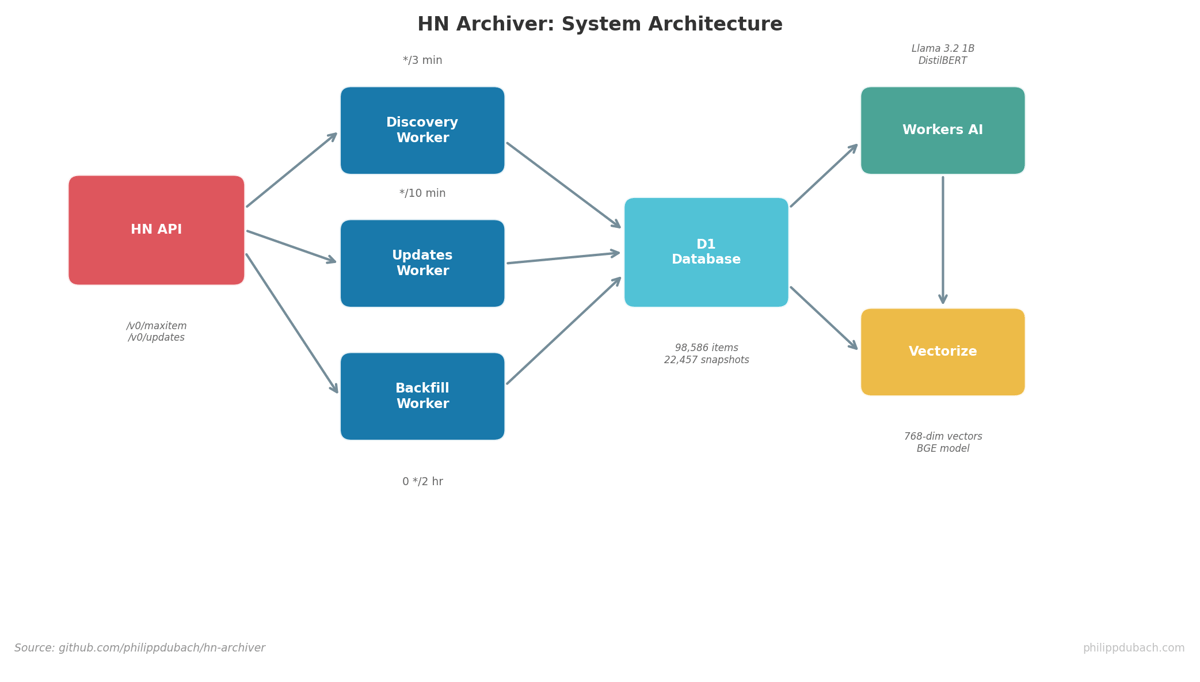
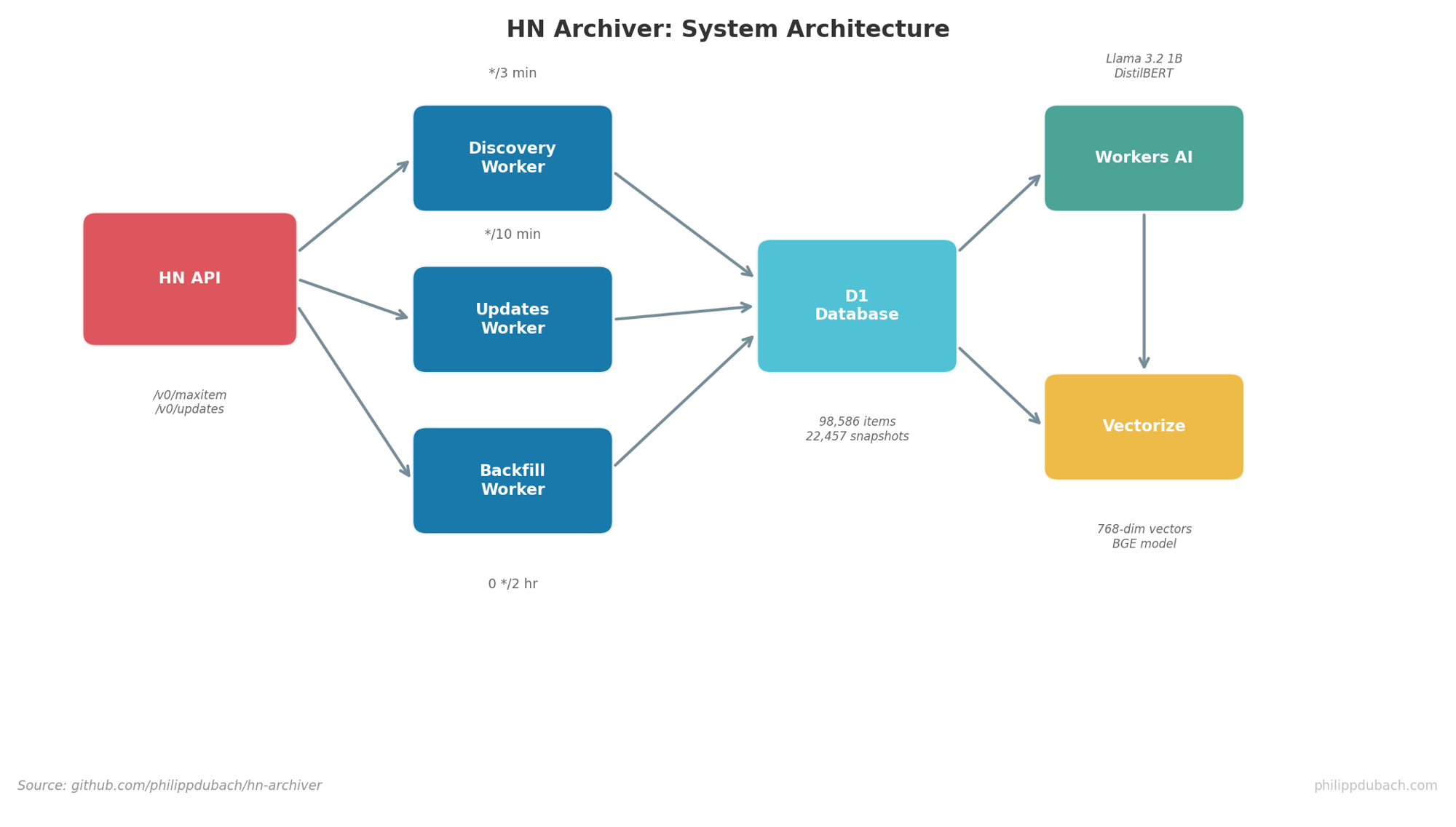
Three cron-triggered workers handle the data pipeline:
| Worker | Schedule | Function |
|---|---|---|
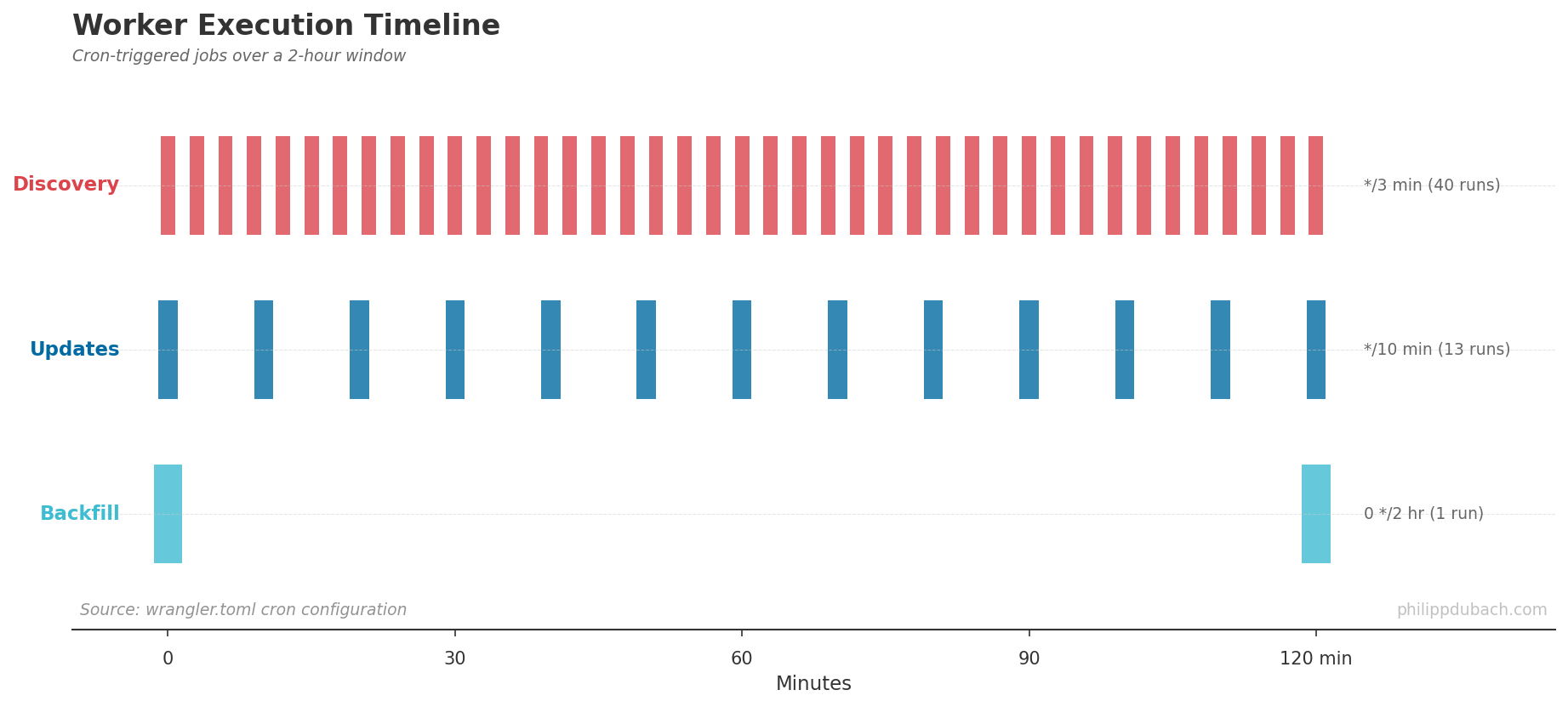
| Discovery | Every 3 min | Fetches new items from lastSeen+1 to current maxitem |
| Updates | Every 10 min | Refreshes recently changed items via /v0/updates |
| Backfill | Every 2 hours | Revisits stale high-value items, runs AI analysis, generates embeddings |
The HN API is straightforward. /v0/maxitem returns the highest item ID, /v0/updates returns recently changed items and profiles. Individual items come from /v0/item/{id}. Firebase-style, real-time capable, but I opted for polling to stay within rate limits.

Discovery: Catching New Content
The discovery worker runs every 3 minutes. It reads the last seen item ID from state, fetches the current max from HN, then iterates through the gap:
| |
Batch size is capped at 500 items per run. During peak hours, HN generates 50-100 new items per minute, so 3-minute intervals with 500-item batches keeps up comfortably.
The batchUpsertItems function is where things get interesting. It’s designed for idempotency:
- Fetch existing items by ID
- Compare each field to detect actual changes
- Only write rows that differ
- Create snapshots based on change magnitude
This means re-running discovery on the same ID range is safe. The function returns { processed, changed, snapshots } counts for monitoring.
Snapshots: Capturing Score Evolution
Not every update deserves a snapshot. Writing 100K snapshots per day would exhaust D1’s row limits quickly. Instead, I use selective triggers:
| |
The snapshot_reason enum captures why each snapshot was created: score_spike, front_page, sample, or new_item. This metadata proved essential for the research analysis, letting me filter for specific observation types.
Snapshot schema:
| |
The compound index on (item_id, created_at) makes lifecycle queries fast: “Give me all snapshots for item X ordered by time.”
AI Classification Pipeline
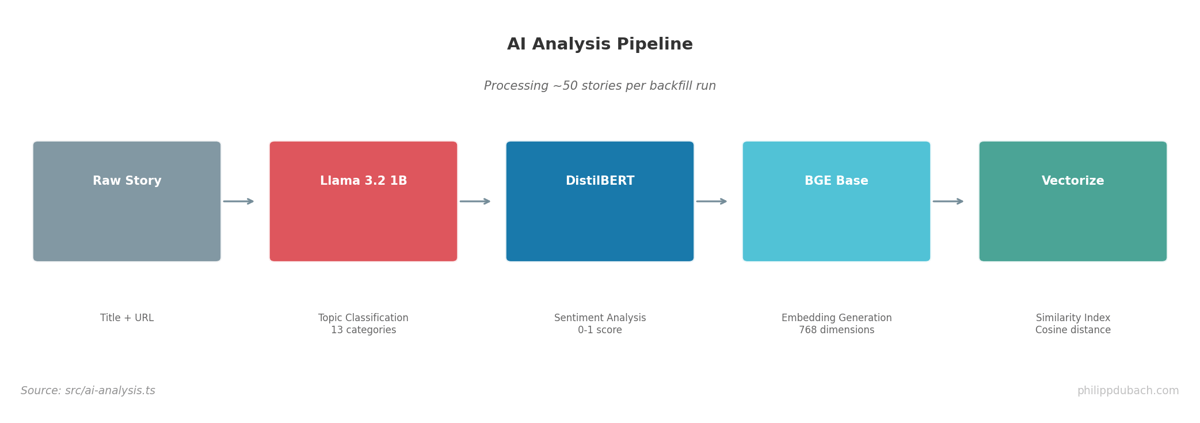
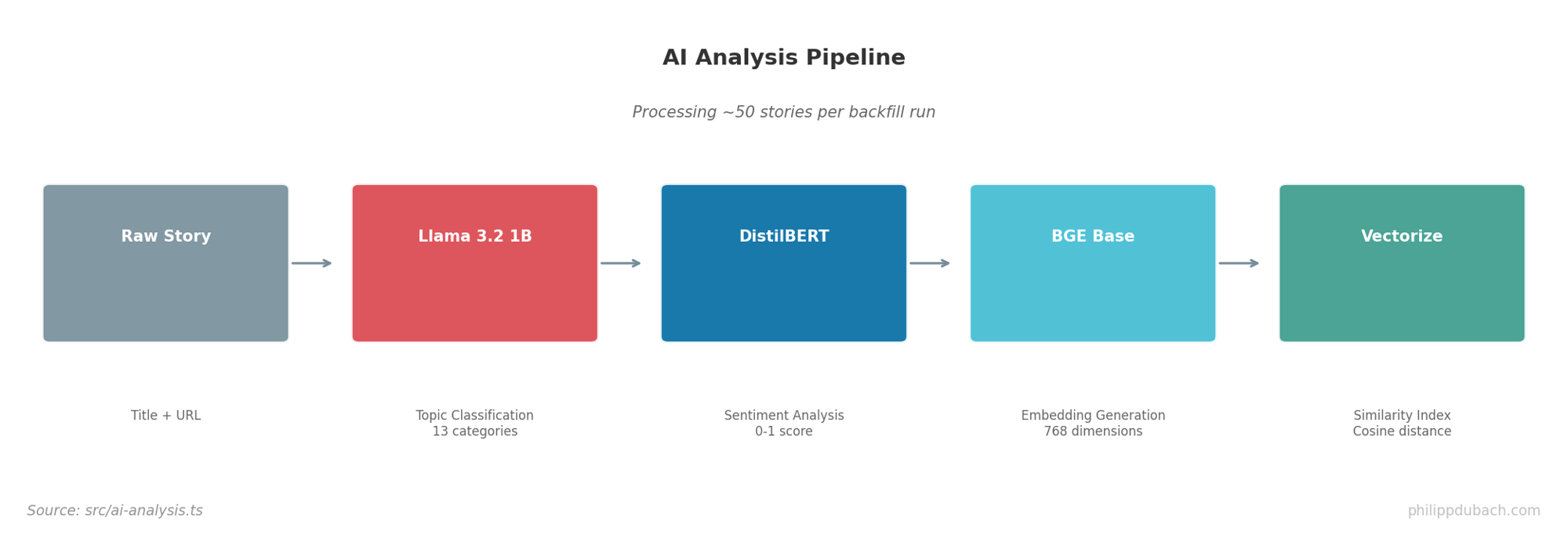
Every story gets three AI treatments:
Topic Classification uses @cf/meta/llama-3.2-1b-instruct with a structured prompt:
| |
Low temperature (0.1) keeps responses consistent. The 13-category taxonomy emerged from initial clustering of HN content types.
Sentiment Analysis uses @cf/huggingface/distilbert-sst-2-int8:
| |
Embeddings for similarity search use @cf/baai/bge-base-en-v1.5:
| |
The 768-dimensional BGE embeddings go into Cloudflare’s Vectorize index for cosine similarity search. Finding related posts becomes a single API call:
| |
Budget Constraints
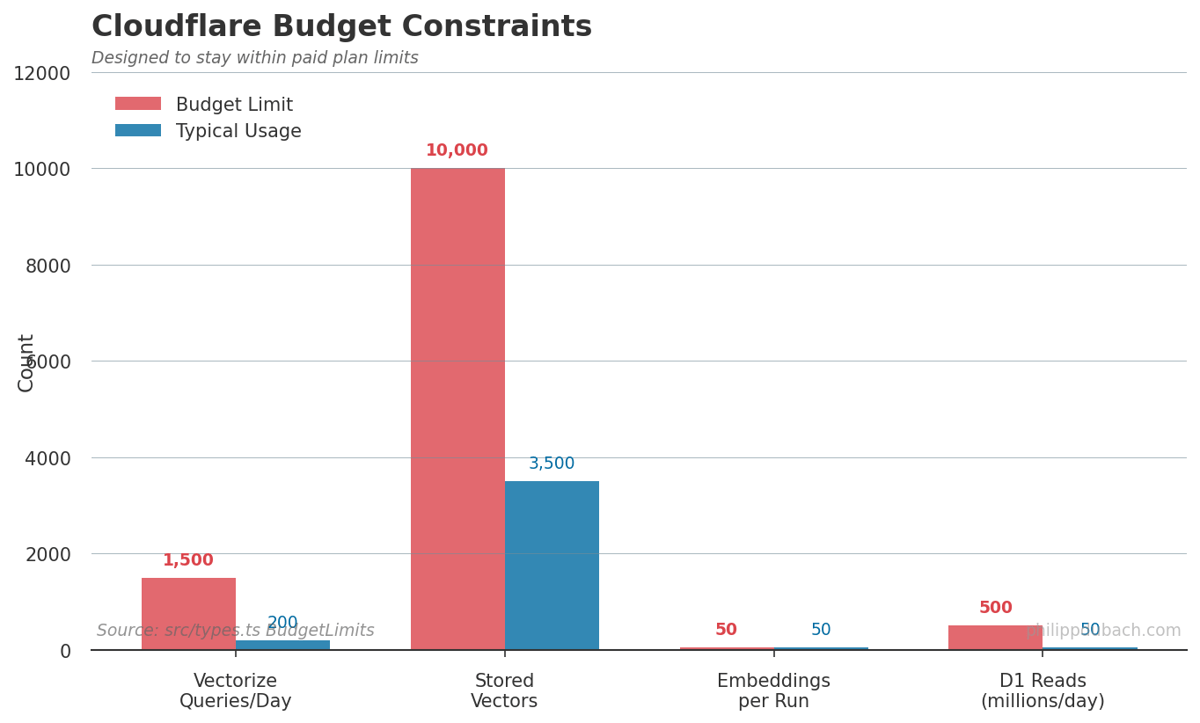
Cloudflare’s paid plan includes generous but finite quotas. The system is designed to stay well within them:
| |
Usage tracking happens in the usage_counters table:
| |
The /api/usage endpoint exposes current consumption. Warnings appear at 80% of limits.
Security Patterns
Several patterns keep the system safe:
Rate limiting uses an in-memory map with 100 requests/IP/minute limit:
| |
Timing-safe auth comparison prevents timing attacks on the trigger secret:
| |
Fail-closed auth returns 503 if TRIGGER_SECRET isn’t configured, never proceeds with missing credentials:
| |
Parameterized SQL everywhere. No string interpolation, ever:
| |
Local Development
The full stack runs locally via Wrangler:
| |
For testing, Vitest with Miniflare provides mocked D1/AI/Vectorize bindings:
| |
What I Learned
Building this system taught me several lessons:
Idempotency matters for data pipelines. Cron jobs fail, restart, and overlap. Every write operation needs to handle re-runs gracefully. The upsert pattern with change detection made debugging much simpler.
Selective snapshots beat exhaustive logging. I initially tried capturing every score change. D1’s row limits forced a better approach. The trigger-based system captures the interesting moments while staying within budget.
Edge AI is production-ready. Workers AI handled 50 stories per backfill run without issues. Latency is acceptable (200-500ms per classification), and the models are good enough for research categorization. I wouldn’t use them for customer-facing classification without human review, but for analytics they work well.
Budget awareness should be built in. Tracking usage counters from day one prevented nasty surprises. The 10K vector limit in Vectorize shaped the retention policy: I only embed high-scoring stories, not every comment.
The full source is at github.com/philippdubach/hn-archiver. Analysis code is at github.com/philippdubach/hn-analyzer. PRs welcome.
The architecture patterns here, serverless cron workers, idempotent upserts, selective event capture, edge AI classification, transfer directly to enterprise use cases. I’ve applied similar approaches to client analytics systems in banking, where real-time behavioral data feeds ML models for personalization and next-best-action recommendations. The technical constraints differ (compliance, latency requirements, integration complexity), but the core design principles remain: build for observability, design for failure, and let budget constraints shape architecture decisions early.